Tutorial 3: MERFISH Human Developmental Cortex
In this tutorial, we implemented NovAST using the human MERFISH developmental cortex dataset, with the original data available at the Zenodo. We converted the data into AnnData (.h5ad) format and stored in the demo_data/Tutorial3_MERFISH_development_cortex directory in this GitHub repository. We use slice UMB5900-BA40a as reference and slice
UMB5900-BA40b as target, with both from the gestational week 34.
1. Import NovAST Functions
After installing the package, import the required functions from NovAST for subsequent use.
[1]:
from NovAST import run_NovAST, NovAST_plot, NovAST_evaluation
import warnings
warnings.filterwarnings("ignore")
/oscar/home/yzhu194/stellar_py/lib/python3.11/site-packages/tqdm/auto.py:21: TqdmWarning: IProgress not found. Please update jupyter and ipywidgets. See https://ipywidgets.readthedocs.io/en/stable/user_install.html
  from .autonotebook import tqdm as notebook_tqdm
2. Data Preparation
NovAST requires both reference and target datasets in AnnData (.h5ad) format. Specify the dataset paths below for subsequent loading.
[ ]:
reference_path="gw34_UMB5900-BA40a.h5ad"
target_path="gw34_UMB5900-BA40b.h5ad"
Next, we set NovAST to evaluation mode, since ground-truth cell type annotations are available for both the reference and target datasets and we aim to quantitatively evaluate model performance. Accordingly, we specify the columns that store the cell type labels for each dataset. A unique aspect of this dataset is that we remove cell type labels at a higher level of the hierarchy, such that an entire group of related cell types sharing the same root is excluded simultaneously.
[ ]:
training_mode = "evaluation"

# Column name in the reference and target AnnData that stores cell-type annotations
celltype_name_reference="H2_annotation"
celltype_name_target="H2_annotation"

# Unique to this dataset, we set the cell type labels used for removal at one level higher in hierarchy than the lables for transfer
celltype_name_reference_select="H1_annotation"
celltype_name_target_select="H1_annotation"
3. Required Arguments
The following parameters must be specified when running NovAST:
[ ]:
# Name of the output directory where results will be saved
name="demo_evaluation_removefurthest"

# A user-defined dataset identifier used for organizing output files
dataset = "merfish_development_cortex"

# Saving directory
savedir = "./"
run_NovAST() if customization is needed. For instance, rounds is set to 10 by default. Reducing this value can substantially decrease runtime by performing fewer training rounds, at the cost of a slight performance drop due to the ensemble strategy.4. Run NovAST
In the manuscript, we applied the pseudo-novel strategy by manually removing one cell type from the reference dataset and treating it as ground-truth novel cells in the target dataset. Accordingly, all arguments remain the same except that remove_celltype is set to True to enable the pseudo-novel mode, and remove_celltype_type is set to one of ['most', 'least', 'closest', 'furthest'], corresponding to the Most Abundant, Least Abundant, Most Mixed, and Most
Separated scenarios, respectively.
Here, we illustrate the Most Separated setting.
[3]:
args = run_NovAST(
    training_mode=training_mode,
    reference_path=reference_path,
    target_path=target_path,
    celltype_name_reference=celltype_name_reference,
    celltype_name_target=celltype_name_target,
    celltype_name_reference_select=celltype_name_reference_select,
    celltype_name_target_select=celltype_name_target_select,
    remove_celltype=True,
    remove_celltype_type="furthest",
    name=name,
    dataset=dataset,
    spot_size=5
)
Random seed set as 42
The saving directory set to ./demo_evaluation_removefurthest
H1_annotation
Number of overlapped genes: 300
Datasets have been preprocessed!
2026-02-06 21:10:22.029856: I tensorflow/core/platform/cpu_feature_guard.cc:210] This TensorFlow binary is optimized to use available CPU instructions in performance-critical operations.
To enable the following instructions: AVX2 FMA, in other operations, rebuild TensorFlow with the appropriate compiler flags.
2026-02-06 21:10:26.801857: W tensorflow/compiler/tf2tensorrt/utils/py_utils.cc:38] TF-TRT Warning: Could not find TensorRT
Removed from TRAIN: ['EN-ET']
──────────────────────────────────────────
Starting training for seed 1...
Random seed set as 2
Part I training started! Round 1
Training: 100%|██████████| 50/50 [05:55<00:00, 7.11s/it]
Part I training done
--- 456.812317609787 seconds ---
Step2 started!
Cells more than 100k, use the faster version!
UMAPing takes 376.90012884140015 seconds
Labelspreading takes 160.5746350288391 seconds
Part II training done
--- 623.7209413051605 seconds ---
──────────────────────────────────────────
Starting training for seed 2...
Random seed set as 3
Part I training started! Round 2
Training: 100%|██████████| 50/50 [05:58<00:00, 7.16s/it]
Part I training done
--- 458.9369010925293 seconds ---
Step2 started!
Cells more than 100k, use the faster version!
UMAPing takes 375.1913969516754 seconds
Labelspreading takes 160.44832754135132 seconds
Part II training done
--- 621.9773857593536 seconds ---
──────────────────────────────────────────
Starting training for seed 3...
Random seed set as 4
Part I training started! Round 3
Training: 100%|██████████| 50/50 [05:58<00:00, 7.17s/it]
Part I training done
--- 459.2217619419098 seconds ---
Step2 started!
Cells more than 100k, use the faster version!
UMAPing takes 373.46581530570984 seconds
Labelspreading takes 160.07290720939636 seconds
Part II training done
--- 619.7878022193909 seconds ---
──────────────────────────────────────────
Starting training for seed 4...
Random seed set as 5
Part I training started! Round 4
Training: 100%|██████████| 50/50 [05:59<00:00, 7.18s/it]
Part I training done
--- 459.6803433895111 seconds ---
Step2 started!
Cells more than 100k, use the faster version!
UMAPing takes 374.52604126930237 seconds
Labelspreading takes 162.06407380104065 seconds
Part II training done
--- 623.0342168807983 seconds ---
──────────────────────────────────────────
Starting training for seed 5...
Random seed set as 6
Part I training started! Round 5
Training: 100%|██████████| 50/50 [06:01<00:00, 7.23s/it]
Part I training done
--- 462.33499813079834 seconds ---
Step2 started!
Cells more than 100k, use the faster version!
UMAPing takes 375.2227957248688 seconds
Labelspreading takes 161.2364616394043 seconds
Part II training done
--- 621.6774928569794 seconds ---
──────────────────────────────────────────
Starting training for seed 6...
Random seed set as 7
Part I training started! Round 6
Training: 100%|██████████| 50/50 [06:00<00:00, 7.21s/it]
Part I training done
--- 460.82968378067017 seconds ---
Step2 started!
Cells more than 100k, use the faster version!
UMAPing takes 374.28268575668335 seconds
Labelspreading takes 160.61685156822205 seconds
Part II training done
--- 621.2845821380615 seconds ---
──────────────────────────────────────────
Starting training for seed 7...
Random seed set as 8
Part I training started! Round 7
Training: 100%|██████████| 50/50 [06:00<00:00, 7.22s/it]
Part I training done
--- 461.5021185874939 seconds ---
Step2 started!
Cells more than 100k, use the faster version!
UMAPing takes 375.50377655029297 seconds
Labelspreading takes 162.78348779678345 seconds
Part II training done
--- 624.6846196651459 seconds ---
──────────────────────────────────────────
Starting training for seed 8...
Random seed set as 9
Part I training started! Round 8
Training: 100%|██████████| 50/50 [05:58<00:00, 7.17s/it]
Part I training done
--- 458.17384338378906 seconds ---
Step2 started!
Cells more than 100k, use the faster version!
UMAPing takes 373.48120164871216 seconds
Labelspreading takes 158.87709546089172 seconds
Part II training done
--- 618.4473536014557 seconds ---
──────────────────────────────────────────
Starting training for seed 9...
Random seed set as 10
Part I training started! Round 9
Training: 100%|██████████| 50/50 [05:56<00:00, 7.13s/it]
Part I training done
--- 456.6168577671051 seconds ---
Step2 started!
Cells more than 100k, use the faster version!
UMAPing takes 373.230917930603 seconds
Labelspreading takes 160.25218629837036 seconds
Part II training done
--- 618.4037342071533 seconds ---
──────────────────────────────────────────
Starting training for seed 10...
Random seed set as 11
Part I training started! Round 10
Training: 100%|██████████| 50/50 [05:52<00:00, 7.05s/it]
Part I training done
--- 452.82636308670044 seconds ---
Step2 started!
Cells more than 100k, use the faster version!
UMAPing takes 373.5510380268097 seconds
Labelspreading takes 158.58914732933044 seconds
Part II training done
--- 617.4199283123016 seconds ---
Loading seed 1
Loading seed 2
Loading seed 3
Loading seed 4
Loading seed 5
Loading seed 6
Loading seed 7
Loading seed 8
Loading seed 9
Loading seed 10
Saving voted seed 1
Saving voted seed 2
Saving voted seed 3
Saving voted seed 4
Saving voted seed 5
Saving voted seed 6
Saving voted seed 7
Saving voted seed 8
Saving voted seed 9
Saving voted seed 10
For each training round, the pipeline saves all outputs to the specified directory, with each random seed assigned its own subfolder. This includes the trained model, the Stage-1 loss values, and a final result file named ``adata_unlabeled_final.h5ad``, which stores the latent embeddings in ``.obsm[‘X_latent’]`` and the final predicted labels in ``.obs[‘voted_final_prediction’]``.
5. Visualize the output
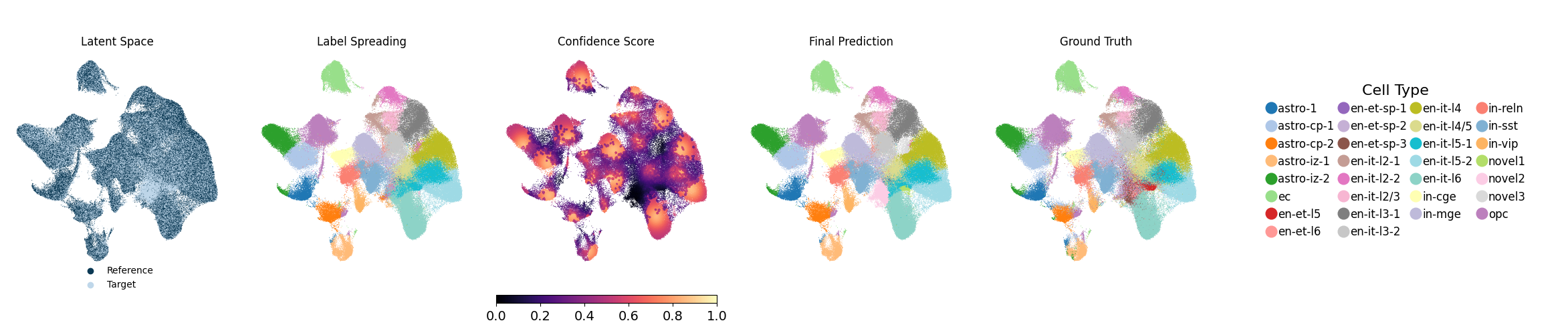
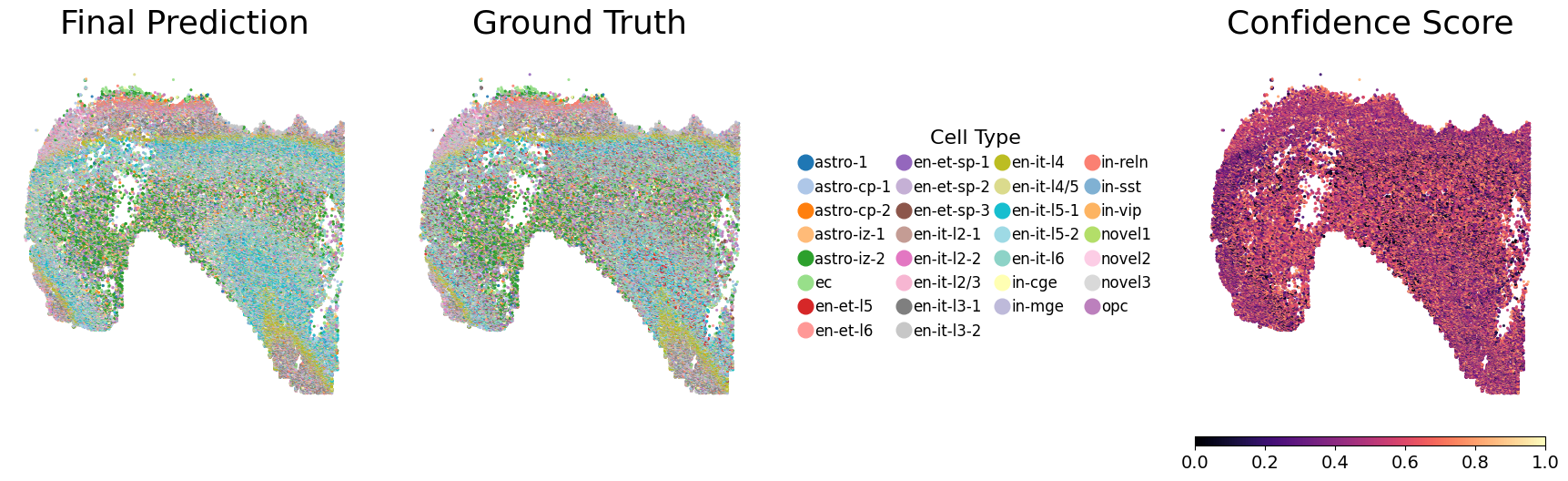
Running the following line of code will generate UMAP visualizations as well as spatial plots of the predicted cell types and their associated confidence scores, and save them to each individual seed’s output directory. Evaluation metrics will also be computed and saved. Below, we show one representative seed.
[5]:
metrics_df = NovAST_evaluation(args)
Evaluation mode detected. Processing 10 seeds...

──────────────────────────────────────────
Starting evaluation for seed 1...
Random seed set as 2
Generating UMAP plot with ground truth...
UMAP plot saved.
Generating spatial plot (region key = None)...
Spatial plot saved.

──────────────────────────────────────────
Starting evaluation for seed 2...
Random seed set as 3
Generating UMAP plot with ground truth...
UMAP plot saved.
Generating spatial plot (region key = None)...
Spatial plot saved.

──────────────────────────────────────────
Starting evaluation for seed 3...
Random seed set as 4
Generating UMAP plot with ground truth...
UMAP plot saved.
Generating spatial plot (region key = None)...
Spatial plot saved.

──────────────────────────────────────────
Starting evaluation for seed 4...
Random seed set as 5
Generating UMAP plot with ground truth...
UMAP plot saved.
Generating spatial plot (region key = None)...
Spatial plot saved.

──────────────────────────────────────────
Starting evaluation for seed 5...
Random seed set as 6
Generating UMAP plot with ground truth...
UMAP plot saved.
Generating spatial plot (region key = None)...
Spatial plot saved.

──────────────────────────────────────────
Starting evaluation for seed 6...
Random seed set as 7
Generating UMAP plot with ground truth...
UMAP plot saved.
Generating spatial plot (region key = None)...
Spatial plot saved.

──────────────────────────────────────────
Starting evaluation for seed 7...
Random seed set as 8
Generating UMAP plot with ground truth...
UMAP plot saved.
Generating spatial plot (region key = None)...
Spatial plot saved.

──────────────────────────────────────────
Starting evaluation for seed 8...
Random seed set as 9
Generating UMAP plot with ground truth...
UMAP plot saved.
Generating spatial plot (region key = None)...
Spatial plot saved.

──────────────────────────────────────────
Starting evaluation for seed 9...
Random seed set as 10
Generating UMAP plot with ground truth...
UMAP plot saved.
Generating spatial plot (region key = None)...
Spatial plot saved.

──────────────────────────────────────────
Starting evaluation for seed 10...
Random seed set as 11
Generating UMAP plot with ground truth...
UMAP plot saved.
Generating spatial plot (region key = None)...
Spatial plot saved.

──────────────────────────────────────────
All seeds processed. Computing aggregated metrics...

Mapping relationship: {'novel2': 'en-et-sp-1'}
Mapping relationship: {'novel1': 'en-et-sp-1', 'novel2': 'en-et-l6', 'en-et-sp-1': 'novel2', 'novel5': 'en-et-sp-2', 'en-et-l6': 'novel4', 'novel3': 'en-et-sp-3', 'en-et-sp-2': 'novel5', 'novel4': 'novel1', 'en-et-sp-3': 'novel3', 'en-et-l5': 'en-et-l5'}
Mapping relationship: {'novel2': 'en-et-sp-1'}
No cluster needs mapping — returning original labels.
Mapping relationship: {'novel3': 'en-et-sp-1'}
No cluster needs mapping — returning original labels.
No cluster needs mapping — returning original labels.
Mapping relationship: {'novel3': 'en-et-sp-1'}
Mapping relationship: {'novel1': 'en-et-sp-1'}
Mapping relationship: {'novel2': 'en-et-sp-1', 'novel1': 'en-et-l5'}

========== Mean Metrics Across Seeds ==========
accuracy       0.7981
weighted_F1    0.7739
ARI            0.7187
macro_F1       0.6619
dtype: float64
==============================================


Best seed = 10 | accuracy=0.8058 | weighted_F1=0.7853 | macro_F1=0.6912 | ARI=0.7362