Tutorial 4: Xenium IPF Lung
In this tutorial, we applied NovAST to samples from a healthy donor (VUHD116) and a patient with idiopathic pulmonary fibrosis (IPF; VUILD107), as described in the associated paper and based on the corresponding original dataset. We converted the data into AnnData (.h5ad) format and stored it in the demo_data/Tutorial4_Xenium_IPF_lung directory in this GitHub
repository.
1. Import NovAST Functions
After installing the package, import the required functions from NovAST for subsequent use.
[1]:
from NovAST import run_NovAST, NovAST_plot, NovAST_evaluation
/oscar/home/yzhu194/stellar_py/lib/python3.11/site-packages/tqdm/auto.py:21: TqdmWarning: IProgress not found. Please update jupyter and ipywidgets. See https://ipywidgets.readthedocs.io/en/stable/user_install.html
  from .autonotebook import tqdm as notebook_tqdm
[6]:
import os, warnings
os.environ["KMP_WARNINGS"] = "off"
warnings.filterwarnings('ignore')
2. Data Preparation
NovAST requires both reference and target datasets in AnnData (.h5ad) format. Specify the dataset paths below for subsequent loading. Additionally, we set NovAST to exploration mode assuming the target dataset does not contain ground-truth labels.
[ ]:
reference_path="VUHD116_Control.h5ad"
target_path="VUILD107_Disease.h5ad"

training_mode = "exploration"
3. Required Arguments
The following parameters must be specified when running NovAST:
[ ]:
# Column name in the reference AnnData that stores cell-type annotations
celltype_name_reference = "final_lineage"

# Name of the output directory where results will be saved
name = "demo_exploration"

# A user-defined dataset identifier used for organizing output files
dataset = "Xenium_IPF_lung"

# Saving directory
savedir = "./"
run_NovAST() if customization is needed.4. Run NovAST
You can now run NovAST using the specified settings as follows:
[8]:
args = run_NovAST(
    training_mode=training_mode,
    reference_path=reference_path,
    target_path=target_path,
    celltype_name_reference=celltype_name_reference,
    name=name,
    dataset=dataset,
    spot_size=1,
)
Random seed set as 42
The saving directory set to ./demo_exploration
The training mode set to exploration!
Number of overlapped genes: 343
Datasets have been preprocessed!
──────────────────────────────────────────
Starting training for seed 1...
Random seed set as 2
Part I training started! Round 1
Training: 100%|██████████| 50/50 [03:04<00:00, 3.69s/it]
Part I training done
--- 259.8540189266205 seconds ---
Step2 started!
2026-02-04 06:40:48.884421: I tensorflow/core/platform/cpu_feature_guard.cc:210] This TensorFlow binary is optimized to use available CPU instructions in performance-critical operations.
To enable the following instructions: AVX2 FMA, in other operations, rebuild TensorFlow with the appropriate compiler flags.
2026-02-04 06:40:53.840126: W tensorflow/compiler/tf2tensorrt/utils/py_utils.cc:38] TF-TRT Warning: Could not find TensorRT
Labelspreading takes 42.26578998565674 seconds
Part II training done
--- 344.6692771911621 seconds ---
──────────────────────────────────────────
Starting training for seed 2...
Random seed set as 3
Part I training started! Round 2
Training: 100%|██████████| 50/50 [03:16<00:00, 3.93s/it]
Part I training done
--- 260.469206571579 seconds ---
Step2 started!
Labelspreading takes 44.609535932540894 seconds
Part II training done
--- 337.4741976261139 seconds ---
──────────────────────────────────────────
Starting training for seed 3...
Random seed set as 4
Part I training started! Round 3
Training: 100%|██████████| 50/50 [02:22<00:00, 2.86s/it]
Part I training done
--- 201.5895972251892 seconds ---
Step2 started!
Labelspreading takes 41.08473324775696 seconds
Part II training done
--- 321.2426588535309 seconds ---
──────────────────────────────────────────
Starting training for seed 4...
Random seed set as 5
Part I training started! Round 4
Training: 100%|██████████| 50/50 [02:45<00:00, 3.31s/it]
Part I training done
--- 240.82358646392822 seconds ---
Step2 started!
Labelspreading takes 45.43288993835449 seconds
Part II training done
--- 308.7579448223114 seconds ---
──────────────────────────────────────────
Starting training for seed 5...
Random seed set as 6
Part I training started! Round 5
Training: 100%|██████████| 50/50 [02:20<00:00, 2.81s/it]
Part I training done
--- 196.25952768325806 seconds ---
Step2 started!
Labelspreading takes 41.677101373672485 seconds
Part II training done
--- 340.7274343967438 seconds ---
──────────────────────────────────────────
Starting training for seed 6...
Random seed set as 7
Part I training started! Round 6
Training: 100%|██████████| 50/50 [03:02<00:00, 3.65s/it]
Part I training done
--- 255.28046441078186 seconds ---
Step2 started!
Labelspreading takes 41.93890333175659 seconds
Part II training done
--- 272.6522445678711 seconds ---
──────────────────────────────────────────
Starting training for seed 7...
Random seed set as 8
Part I training started! Round 7
Training: 100%|██████████| 50/50 [02:18<00:00, 2.77s/it]
Part I training done
--- 237.10288071632385 seconds ---
Step2 started!
Labelspreading takes 41.241560220718384 seconds
Part II training done
--- 330.20014119148254 seconds ---
──────────────────────────────────────────
Starting training for seed 8...
Random seed set as 9
Part I training started! Round 8
Training: 100%|██████████| 50/50 [02:57<00:00, 3.54s/it]
Part I training done
--- 236.00374746322632 seconds ---
Step2 started!
Labelspreading takes 40.96816563606262 seconds
Part II training done
--- 262.26364636421204 seconds ---
──────────────────────────────────────────
Starting training for seed 9...
Random seed set as 10
Part I training started! Round 9
Training: 100%|██████████| 50/50 [03:18<00:00, 3.96s/it]
Part I training done
--- 272.232182264328 seconds ---
Step2 started!
Labelspreading takes 41.36509656906128 seconds
Part II training done
--- 337.9003162384033 seconds ---
──────────────────────────────────────────
Starting training for seed 10...
Random seed set as 11
Part I training started! Round 10
Training: 100%|██████████| 50/50 [02:21<00:00, 2.83s/it]
Part I training done
--- 198.39092469215393 seconds ---
Step2 started!
Labelspreading takes 41.053640365600586 seconds
Part II training done
--- 330.3719985485077 seconds ---
Loading seed 1
Loading seed 2
Loading seed 3
Loading seed 4
Loading seed 5
Loading seed 6
Loading seed 7
Loading seed 8
Loading seed 9
Loading seed 10
Saving voted seed 1
Saving voted seed 2
Saving voted seed 3
Saving voted seed 4
Saving voted seed 5
Saving voted seed 6
Saving voted seed 7
Saving voted seed 8
Saving voted seed 9
Saving voted seed 10
For each training round, the pipeline saves all outputs to the specified directory, with each random seed assigned its own subfolder. This includes the trained model, the Stage-1 loss values, and a final result file named ``adata_unlabeled_final.h5ad``, which stores the latent embeddings in ``.obsm[‘X_latent’]`` and the final predicted labels in ``.obs[‘voted_final_prediction’]``.
5. Visualize the output
Running the following line of code will generate UMAP visualizations as well as spatial plots of the predicted cell types and their associated confidence scores, and save them to each individual seed’s output directory.
[10]:
NovAST_plot(args)
Exploration mode detected. Generating plots for 10 seeds...

──────────────────────────────────────────
Starting plotting for seed 1...
Random seed set as 2
Generating UMAP plot...
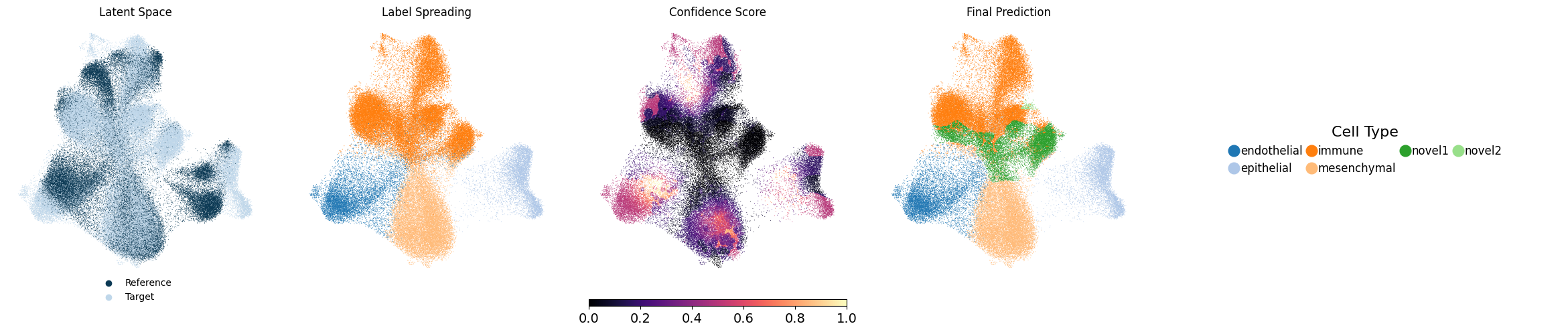
UMAP plot saved.
Generating spatial plot...
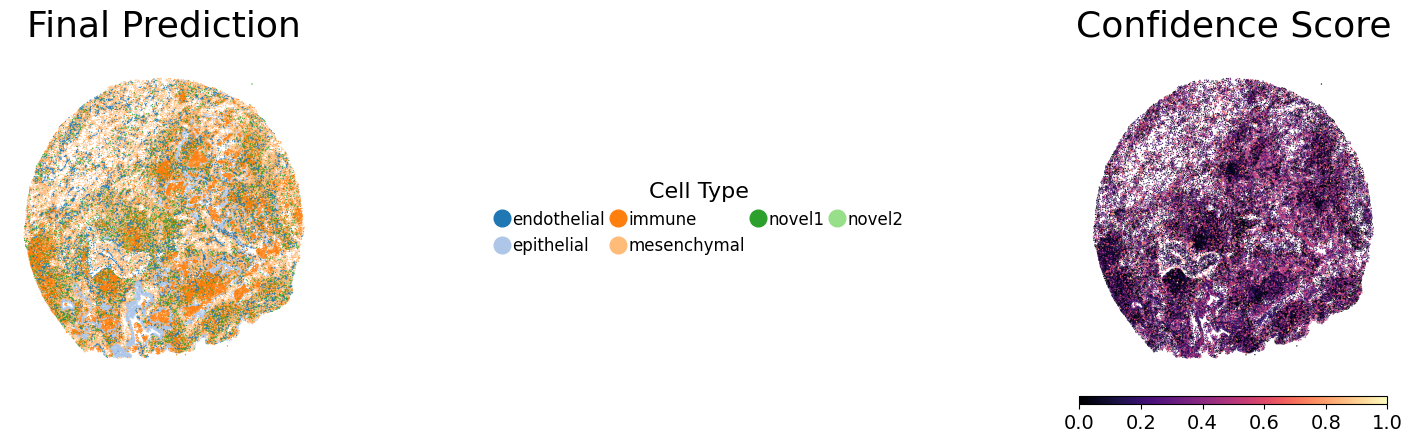
Spatial plot saved.

──────────────────────────────────────────
Starting plotting for seed 2...
Random seed set as 3
Generating UMAP plot...
UMAP plot saved.
Generating spatial plot...
Spatial plot saved.

──────────────────────────────────────────
Starting plotting for seed 3...
Random seed set as 4
Generating UMAP plot...
UMAP plot saved.
Generating spatial plot...
Spatial plot saved.

──────────────────────────────────────────
Starting plotting for seed 4...
Random seed set as 5
Generating UMAP plot...
UMAP plot saved.
Generating spatial plot...
Spatial plot saved.

──────────────────────────────────────────
Starting plotting for seed 5...
Random seed set as 6
Generating UMAP plot...
UMAP plot saved.
Generating spatial plot...
Spatial plot saved.

──────────────────────────────────────────
Starting plotting for seed 6...
Random seed set as 7
Generating UMAP plot...
UMAP plot saved.
Generating spatial plot...
Spatial plot saved.

──────────────────────────────────────────
Starting plotting for seed 7...
Random seed set as 8
Generating UMAP plot...
UMAP plot saved.
Generating spatial plot...
Spatial plot saved.

──────────────────────────────────────────
Starting plotting for seed 8...
Random seed set as 9
Generating UMAP plot...
UMAP plot saved.
Generating spatial plot...
Spatial plot saved.

──────────────────────────────────────────
Starting plotting for seed 9...
Random seed set as 10
Generating UMAP plot...
UMAP plot saved.
Generating spatial plot...
Spatial plot saved.

──────────────────────────────────────────
Starting plotting for seed 10...
Random seed set as 11
Generating UMAP plot...
UMAP plot saved.
Generating spatial plot...
Spatial plot saved.

──────────────────────────────────────────
All seeds plotted successfully.
[ ]: